Connections in Time

Some relationships change over time. Think about your friends from high school, college, work, the city you used to live in, the ones that liked you ex- better, etc. When exploring a social network it is important that we understand not only the strength of the relationship now, but over time. We can use communication between people as a measure.

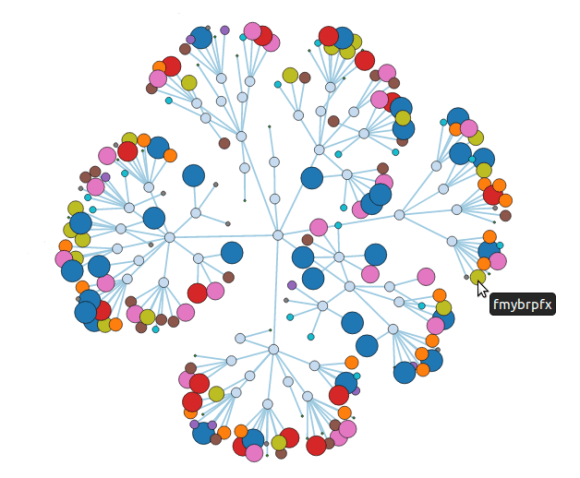
I ran into a visualization that explored how multiple parties where connected by communications in multiple projects. We’re going to reuse it to explore how multiple people interact with each other. So let’s make a network of 50 friends and connect them to each other multiple times. Think of it as people writing on your facebook wall.
Continue reading

Tagged , , , , ,

Batch Importer – Part 2

If you’ve been following along, we got Michael’s Batch Importer, compiled it, created some test data, ran it and saw millions of nodes and relationships loaded into Neo4j.

So now we’re ready for our own data. I am going to show you how to get data from a Relational Database like PostgreSQL into a format we can use. If you’re using SQL Server, MySQL, Oracle, etc, the directions will be slightly different, but you’ll get the picture.
Continue reading

Tagged , , ,

Batch Importer – Part 1

Data is everywhere… all around us, but sometimes the medium it is stored in can be a problem when analyzing it. Chances are you have a ton of data sitting around in a relational database in your current application… or you have begged, borrowed or scraped to get the data from somewhere and now you want to use Neo4j to find how this data is related.

Michael Hunger wrote a batch importer to load csv data quickly, but for some reason it hasn’t received a lot of love. We’re going to change that today and I’m going to walk you through getting your data out of tables and into nodes and edges.

Let’s clone the project and jump in.
Continue reading

Tagged , , , , ,

Max Flow with Gremlin and Transactions

The maximum flow problem was formulated by T.E. Harris as follows:

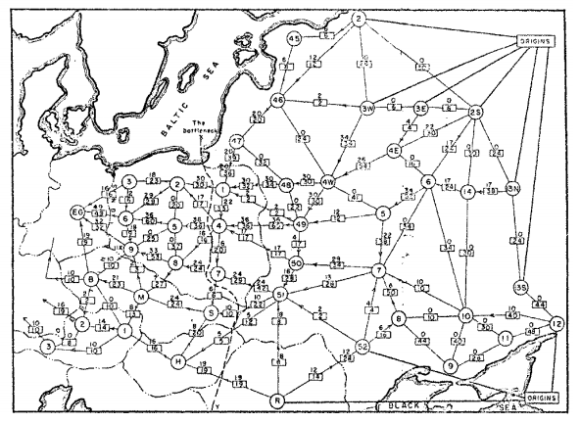
Consider a rail network connecting two cities by way of a number of intermediate cities, where each link of the network has a number assigned to it representing its capacity. Assuming a steady state condition, a nd a maximal flow from one given city to the other.

Back in the mid 1950s the US Military had an interest in finding out how much capacity the Soviet railway network had to move cargo from the Western Soviet Union to Eastern Europe. This lead to the Maximum Flow problem and the Ford–Fulkerson algorithm to solve it.
Continue reading

Tagged , , , , ,

Importing Wikipedia into Neo4j with Graphipedia

Wouldn’t it be cool to import Wikipedia into Neo4j?

Mirko Nasato thought so, and built graphipedia using the batch importer that does just that.

It’s written in Java, so if you’re a pure ruby guy, I’ll walk you through the steps.

Let’s clone the project and jump in.

git clone git://github.com/mirkonasato/graphipedia.git
cd graphipedia

If you look in here you’ll see a pom.xml file which means you’ll need to download Maven and build the project.

sudo apt-get install maven2
mvn install

You’ll see a bunch of stuff flying by, that’s just the dependencies being downloaded. At the end you should see this:
Continue reading

Tagged , , ,

Visualizing a Network with Cypher and D3.js

We’ve seen some pretty nice visualizations of nodes and their immediate neighbors, but we want to be able to visualize more. So we’re going to prepare a 200 node network, use Cypher to extract the data we want and visualize it with D3.js.
Continue reading

Tagged , , , , , , ,

Graph Visualization and Neo4j – Part Three

Like I promised in my previous post, I wanted to do a little something on D3.js.

We are going to take one of their example visualizations and visualize a follows graph.

To create our graph, we will take the names of 20 people: create nodes for them, add them to an index, and randomly link them together.
Continue reading

Tagged , , , , ,

Graph Visualization and Neo4j – Part Two

If you’re into NoSQL and Graph Databases like Neo4j, then you’ll probably tend to be working on back-end development. If you’re lucky enough to work in a team of specialists, some UX guy will come up with user requirements, hand them off to a UI gal for design, who will then pass it on to a Javascript Ninja to slice it together and they’ll just ask you provide the data and stuff it in a JSON object.

If you’re not so lucky and are working on pet projects by yourself then you’ll have to do it all. So I wanted to give you a little nudge into learning a visualization framework. Since my most popular blog post so far has been Graph Visualization and Neo4j and we’ve already seen one example that you’ll probably want to customize in your projects, we’ll stick with processing.js, and in the future I can do a little intro on D3.js, Unveil.js and maybe something a little crazier like VVVV.js.

So getting started is really easy. We’ll create an html document, add the minified processing javascript library and create a canvas element to put our visualization.

<!DOCTYPE html>
<html>
	<head>
		<title>Hello World - Processing.js</title>
		<script src="processing-1.3.6.min.js"></script>
	</head>
	<body>
		<canvas data-src="helloworld.pjs"></canvas>
	</body>
</html>

All right, let’s create the helloworld.pjs we reference as our canvas data source.
Continue reading

Tagged , , , ,

Who is the Greatest?

I done wrestled with an alligator, I done tussled with a whale, only last week I murdered a rock, injured a stone, hospitalized a brick. I’m so mean I make medicine sick.

He floats like a butterfly and stings like a bee, but is Muhammad Ali truly the greatest? Greater than the Beatles? Greater than Alexander? Greater than Sliced Bread? Let’s find out.

We begin by requiring neography and creating a function to help us create the greats.

require 'rubygems'
require 'neography'

def create_great(name)
  Neography::Node.create("name" => name)
end

There are a ton of greats out there, but we’ll keep it simple and create just 8 of the greatest greats.
Continue reading

Tagged , , , , ,

Chicago Graph DB Meet-Up

We had our first Graph Database Meet-up in Chicago yesterday!

16 Graphistas came out to learn more about the craft and get an introduction to Neo4j. Ryan Briones from Groupon gave us a venue and helped host the event. No worries if you missed it, your next chance to learn more about Neo4j is coming up on Tuesday February 7th @ 6pm, when Prasanna Pendse will share his experiences with Neo4j at ChicagoRuby: Downtown.

Our next Chicago Graph DB meet-up is tentatively scheduled for February 29th @ 6 pm. This will be a hands-on meet-up. I’ll help you get started with either Neo4j on your laptop or in the cloud with Heroku. We’ll create a few graphs, learn some basic traversals and get comfortable with Neo4j. I’ll have a GitHub repository graph for us to play with and see how you are connected to Kevin Bacon (err I mean Linus Torvalds). He is the center of the GitHub universe right? Right? We’ll let’s find out.

The slides of our first meet-up are available below:

Tagged , , , , ,