Tag Archives: neo4j

Importing Wikipedia into Neo4j with Graphipedia

Wouldn’t it be cool to import Wikipedia into Neo4j?

Mirko Nasato thought so, and built graphipedia using the batch importer that does just that.

It’s written in Java, so if you’re a pure ruby guy, I’ll walk you through the steps.

Let’s clone the project and jump in.

git clone git://github.com/mirkonasato/graphipedia.git
cd graphipedia

If you look in here you’ll see a pom.xml file which means you’ll need to download Maven and build the project.

sudo apt-get install maven2
mvn install

You’ll see a bunch of stuff flying by, that’s just the dependencies being downloaded. At the end you should see this:
Continue reading
Tagged , , ,

Visualizing a Network with Cypher and D3.js

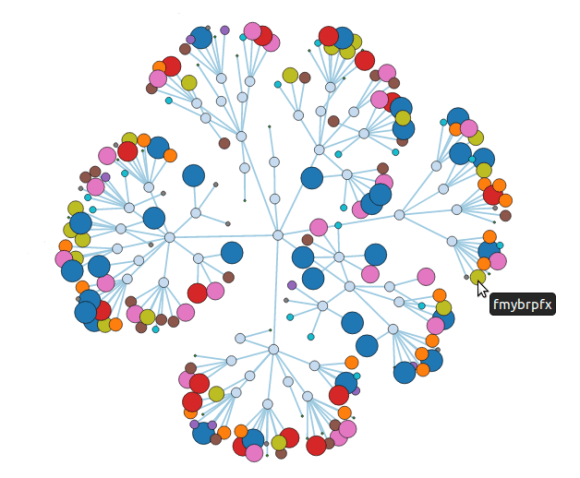
We’ve seen some pretty nice visualizations of nodes and their immediate neighbors, but we want to be able to visualize more. So we’re going to prepare a 200 node network, use Cypher to extract the data we want and visualize it with D3.js.
Continue reading

Tagged , , , , , , ,

Graph Visualization and Neo4j – Part Three

Like I promised in my previous post, I wanted to do a little something on D3.js.

We are going to take one of their example visualizations and visualize a follows graph.

To create our graph, we will take the names of 20 people: create nodes for them, add them to an index, and randomly link them together.
Continue reading

Tagged , , , , ,

Chicago Graph DB Meet-Up

We had our first Graph Database Meet-up in Chicago yesterday!

16 Graphistas came out to learn more about the craft and get an introduction to Neo4j. Ryan Briones from Groupon gave us a venue and helped host the event. No worries if you missed it, your next chance to learn more about Neo4j is coming up on Tuesday February 7th @ 6pm, when Prasanna Pendse will share his experiences with Neo4j at ChicagoRuby: Downtown.

Our next Chicago Graph DB meet-up is tentatively scheduled for February 29th @ 6 pm. This will be a hands-on meet-up. I’ll help you get started with either Neo4j on your laptop or in the cloud with Heroku. We’ll create a few graphs, learn some basic traversals and get comfortable with Neo4j. I’ll have a GitHub repository graph for us to play with and see how you are connected to Kevin Bacon (err I mean Linus Torvalds). He is the center of the GitHub universe right? Right? We’ll let’s find out.

The slides of our first meet-up are available below:

Tagged , , , , ,

Neo4j on Heroku – Part Three

This week we learned that leaving the create_graph method accessible to the world was a bad idea. So let’s go ahead and delete that route in Sinatra, and instead create a Rake Task for it.

In Rakefile:

require 'neography/tasks'
require './neoflix.rb'

namespace :neo4j do
  task :create do
    neo = Neography::Rest.new(ENV['NEO4J_URL'] || "http://localhost:7474")
    create_graph(neo)
  end
end

That’s much better. We can create our graph locally with
Continue reading

Tagged , , , ,

Graph Visualization and Neo4j

So far we’ve learned how to get Neo4j up and running with Neography, how to find friends of friends and degrees of separation with the Neo4j REST API and a little bit of the Gremlin and Cypher languages. However, all we’ve seen is text output. We haven’t really “seen” a graph yet, but that’s about to change.

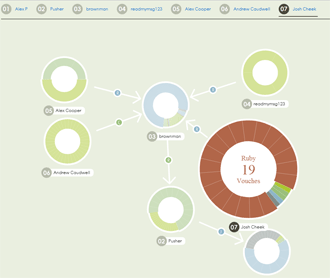
Vouched holds a graph of skill specific recommendations people have made to each other and visualizes it. I extracted the visualization, and hosted it on github as neovigator. You can get your very own visualization up and running or take a look at this instance running on Heroku.

Continue reading

Tagged , , , , , ,

Cypher with Neography

Cypher is the query language of Neo4j, and as promised I’ll show you how you can use it to implement friend recommendations as well as degrees of separation.

We can send any cypher query to Neo4j via the REST API and neography using the execute_query command. Let’s implement suggestions_for so it sends a cypher query to the server:

def suggestions_for(node)
  node_id = node["self"].split('/').last.to_i
  @neo.execute_query("START me = node({node_id})
                      MATCH (me)-[:friends]->(friend)-[:friends]->(foaf)
                      RETURN foaf.name", {:node_id => node_id})["data"]
end

puts "Johnathan should become friends with #{suggestions_for(johnathan).join(', ')}"

# RESULT
# Johnathan should become friends with Mary, Phil

Continue reading

Tagged , , ,

Gremlin with Neography

Gremlin is a domain specific language for traversing property graphs. Neo4j is one of the databases that can speak the gremlin language, and as promised I’ll show you how you can use it to implement friend recommendations as well as degrees of separation.

We can send any gremlin script to Neo4j via the REST API and neography using the execute_script command. Let’s implement suggestions_for so it sends a gremlin script to the server:

def suggestions_for(node)
  node_id = node["self"].split('/').last.to_i
  @neo.execute_script("g.v(node_id).
                         in('friends').
                         in('friends').
                         dedup.
                         filter{it != g.v(node_id)}.
                         name", {:node_id => node_id})
end

puts "Johnathan should become friends with #{suggestions_for(johnathan).join(', ')}"

# RESULT
# Johnathan should become friends with Mary, Phil

Continue reading

Tagged , , , ,

How you’re connected to Kevin Bacon

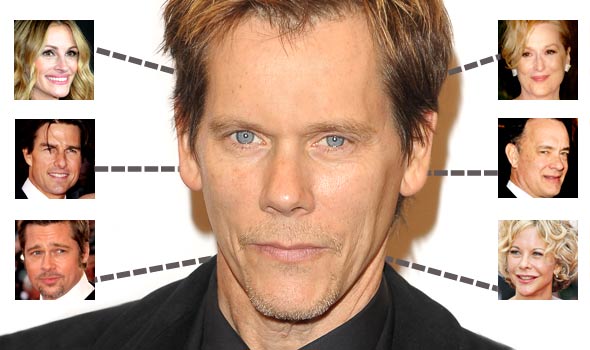
Previously I showed you how to get Neo4j up and running with Ruby and how to find recommended friends on a social network. What about finding out how you are connected to someone outside of your friends of friends network? Do you remember the concept of six degrees of separation? No, how about six degrees of Kevin Bacon?

A credit card commercial explains how this works:

The actor, Kevin Bacon wants to write a check to buy a book, but the clerk asks for his ID, which he does not have. He leaves and returns with a group of people, then says to the clerk, “Okay, I was in a movie with an extra, Eunice, whose hairdresser, Wayne, attended Sunday school with Father O’Neill, who plays racquetball with Dr. Sanjay, who recently removed the appendix of Kim, who dumped you sophomore year. So you see, we’re practically brothers.”

Continue reading

Tagged , , ,

Getting started with Ruby and Neo4j

Getting started with Ruby and Neo4j is very easy.
Follow these steps and you’ll be up and running in no time.

First we install the neography gem:

Using Bundler:

echo "source 'http://rubygems.org'
gem 'neography' " > Gemfile
bundle install 

Without Bundler:

gem install neography

Then we’ll add our tasks to a Rakefile, download Neo4j and start it:

echo "require 'neography/tasks'" > Rakefile
rake neo4j:install
rake neo4j:start

Continue reading

Tagged , ,