August 17, 2012 5:11 AM
Social applications and Graph Databases go together like peanut butter and jelly. I’m going to walk you through the steps of building an application that connects to Facebook, pulls your friends and likes data and visualizes it. I plan on making a video of me coding it one line at a time, but for now let’s just focus on the main elements.
The application will have two major components:
We will be deploying this application on Heroku and making use of the RedisToGo and Neo4j Add-ons.
Let’s start by cloning the application and creating it on Heroku.
git clone git@github.com:maxdemarzi/neosocial.git
heroku apps:create
heroku addons:add neo4j
heroku addons:add redistogo
Since we are connecting to Facebook, you will need to get a Facebook App Id and Secret at https://developers.facebook.com/apps.

Turn on “Website with Facebook Login” and set it to your http://xxxxxxx.herokuapp.com domain.

Come up with a session secret (any long text or sentence will do) and add it and your Facebook parameters to your application.
heroku config:add SESSION_SECRET=<your session secret>
heroku config:add FACEBOOK_APP_ID=<your facebook app id>
heroku config:add FACEBOOK_SECRET=<your facebook secret>
We now just need to deploy our application to Heroku with a git push, and scale the number of workers to 1.
git push heroku master
heroku ps:scale worker=1
If you go to your xxxxx.herokuapp.com domain, you should now see:

So what happens when the user clicks on “Sign in with Facebook”? They are sent to Facebook to authenticate via Oauth, and assuming they approve, a User object is created and they are sent to their profile page.
  ['get', 'post'].each do |method|
    send(method, "/auth/:provider/callback") do
      user = User.create_with_omniauth(env['omniauth.auth'])
      session[:uid] = user.uid

      redirect to(session[:redirect_url] || "/user/#{session[:uid]}")
      session[:redirect_url] = nil
    end
  end
Let’s take a look at the create_with_omniauth method. It is creating a unique node using the Facebook id, token, and values we received from authentication and returning a new User.
def self.create_with_omniauth(auth)
    values = {"name"      => auth.info.name,
              "image_url" => auth.info.image,
              "location"  => auth.info.location,
              "uid"       => auth.uid,
              "token"     => auth.credentials.token}
    node = $neo_server.create_unique_node("user_index", "uid", auth.uid, values)

    Sidekiq::Client.enqueue(Job::ImportFacebookProfile, auth.uid)
    User.new(node)
  end
A node is just a hash, and we could build this whole app using plain hashes, but it makes life easier to build real objects and use them instead. Here is our User class:
class User
  attr_reader :neo_id
  attr_accessor :uid, :name, :image_url, :location, :token

  def initialize(node)
    @neo_id     = node["self"].split('/').last.to_i
    @uid        = node["data"]["uid"]
    @name       = node["data"]["name"]
    @image_url  = node["data"]["img_url"]
    @location   = node["data"]["location"]
    @token      = node["data"]["token"]
  end
...
end
Using real objects allows us to tie in some methods to help us. For example the Facebook client of this user, which uses the token we saved when authenticating and the Koala gem to give us an approved connection to Facebook.
def client
  @client ||= Koala::Facebook::API.new(self.token)
end
Let’s take one step back and look at the line before. It is using the Sidekiq gem to kick off a background job named ImportFacebookProfile.
module Job
  class ImportFacebookProfile
    include Sidekiq::Worker

    def perform(uid)
      user = User.find_by_uid(uid)
      ...

      # Import Friends
      friends = user.client.get_connections("me", "friends")
      friends.each do |friend|
        Sidekiq::Client.enqueue(Job::ImportFriends, uid, friend["id"])
        Job::ImportMutualFriends.perform_at(120, uid, friend["id"])
      end
    end

  end
end
This worker is getting Facebook friends of a user and then creating two sets of jobs. ImportFriends which gets added to the queue right away which does the actual importing of a friend, and ImportMutualFriends which gets added to the queue 2 minutes later.
module Job
  class ImportFriends
    include Sidekiq::Worker

    def perform(uid, person_id)
      user = User.find_by_uid(uid)
      person = user.client.get_object(person_id)
      friend = User.create_from_facebook(person)

      # Make them friends
      commands = []
      commands << [:create_unique_relationship, "friends_index", "ids",  "#{uid}-#{person_id}", "friends", user.neo_id, friend.neo_id]
      commands << [:create_unique_relationship, "friends_index", "ids",  "#{person_id}-#{uid}", "friends", friend.neo_id, user.neo_id]
      batch_result = $neo_server.batch *commands
      ...
The ImportFriends job pulls the full friend profile from Facebook and creates two “friends” relationships with the user (each going one way). The ImportMutualFriends job (shown in its entirety below) connects a friend to the other friends via the mutualfriends Open Graph API command:
module Job
  class ImportMutualFriends
    include Sidekiq::Worker

    def perform(uid, person_id)
      user = User.find_by_uid(uid)
      person = user.client.get_object(person_id)
      friend = User.create_from_facebook(person)

      # Import mutual friends
      mutual_friends = user.client.get_connections("me", "mutualfriends/#{person_id}")

      commands = []

      # Make them friends
      mutual_friends.each do |mutual_friend|
        uid = mutual_friend["id"]

        node = User.find_by_uid(uid)
        unless node
          person = user.client.get_object(uid)
          node = User.create_from_facebook(person)
        end

        commands << [:create_unique_relationship, "friends_index", "ids",  "#{uid}-#{person_id}", "friends", node.neo_id, friend.neo_id]
        commands << [:create_unique_relationship, "friends_index", "ids",  "#{person_id}-#{uid}", "friends", friend.neo_id, node.neo_id]
      end
      batch_result = $neo_server.batch *commands
    end
  end
end
With these friends and friends of friends relationships we can use Cypher inside our User model to gather a friend_matrix. Note the use of parameterized cypher queries. It’s tempting to just insert it in to the string, but inefficient since Neo4j would have to parse it every time. With parameters Neo4j just parses it once and the next time it is ready to execute.
def friend_matrix
    cypher =  "START me = node({id})
               MATCH me -[:friends]-> friends -[:friends]-> fof
               RETURN friends.name, collect(fof.name)
               ORDER BY COUNT(fof) "
    $neo_server.execute_query(cypher, {:id => @neo_id})["data"]
  end
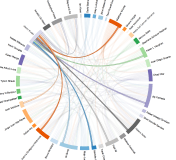
Some folks have hundreds of Facebook friends, and our visualization doesn’t look too good once we get past 50 friends. So instead of visualizing all of the connections, we’ll take a random sample of 20-50 friends. We are simulating friends who randomly showed up to your birthday party. We will build a JSON object which we will pass to D3.js to visualize for us.
get '/visualization' do
    @user = current_user
    random_number = 20 + Random.rand(31)
    @user.friend_matrix.sample(random_number).map{|fm| {"name" => fm[0], "follows" => fm[1]} }.to_json
  end
We are re-using the D3 Chord visualization we saw before and that’s all there is too it.
You can try NeoSocial for your self at http://neosocial.herokuapp.com. As always, the full example application is available on github.
Posted by maxdemarzi
Categories: Cypher, Heroku, Neography, Visualization
Tags: d3.js, github, graph database, heroku, javascript, neo4j, relationship graph, ruby, visualization
Mobile Site | Full Site
Get a free blog at WordPress.com Theme: WordPress Mobile Edition by Alex King.
[…] NeoSocial: Connecting to Facebook with Neo4j by Max De Marzi. […]
By NeoSocial: Connecting to Facebook with Neo4j « Another Word For It on August 17, 2012 at 11:29 AM
Well, I tried it and something went wrong.
By Ravicious on August 21, 2012 at 3:45 AM
Hi Rafal,
If you give it a few minutes all your facebook friends will load. They should already be there by now.
There was a flood of users yesterday due to Reddit and the import jobs were taking longer than normal.
Thanks for trying it out.
Max
By maxdemarzi on August 21, 2012 at 8:25 AM
Hey, there’s an Internal Server Error. is the app out of support?
By adi on July 2, 2014 at 2:37 AM
Amazing job , great article
By Pedro Barrera (@Peterpay) on August 22, 2012 at 10:59 AM
do you have a smiliar project/tutorial connecting twitter? I would like to follow tweets etc…
By Gustav on September 10, 2012 at 3:15 AM
Is there a library to produce the cool visualization shown at the top of this page?
By Martin Streicher (@martinstreicher) on October 23, 2012 at 7:53 AM
Yup that’s D3.js http://d3js.org/
By maxdemarzi on October 23, 2012 at 12:57 PM
How is redis used here? Can you please provide information on that as well?
By Abdul Azeez on October 24, 2012 at 12:04 AM
Redis is used strictly by the Sidekiq gem as a Queue Management system (to handle the requests to Facebook for friend information). See http://mperham.github.com/sidekiq/ for more details.
By maxdemarzi on October 24, 2012 at 12:07 AM
Looks great! Thanks for the prompt response Max.
By Abdul Azeez on October 24, 2012 at 12:32 AM
Awesome!
By Dylan on October 26, 2012 at 3:07 AM
[…] See on maxdemarzi.com […]
By NeoSocial: Connecting to Facebook with Neo4j : #EducaConRS on January 15, 2013 at 11:43 AM
Hi Max, congrats for your work.
Could you please share the data model (json) for the chord?
Regads
By David on January 24, 2013 at 2:23 AM
You can see more about how the chord is made on Graph Visualization and Neo4j – Part Three. The json result looks like:
[{"name":"Alejandra Stace Torres","follows":["Jose Pardo","Gabriela De Marzi","Vicky Pardo de Vargas","Silvana Vargas","Max A De Marzi","Cecily Vargas","Anahi Plenge","Luis Pardo","Alex De Marzi","Karen Plenge","Hortencia Ratto","MariaCarmela Pestana Gayoso"]},{"name":"Michael Gill","follows":["Helene Astier","Ian Wilson","Gary Lutchansky","Rob Asfar","Kurnia Kosasi","Richard Champalbert"]},{"name":"Gary Lutchansky","follows":["Helene Astier","Ian Wilson","Rob Asfar","Kurnia Kosasi","Michael Gill","Richard Champalbert"]}......By maxdemarzi on January 24, 2013 at 8:23 AM
Max, I am having some problems getting it to run.
My configuration details:
I confirm that I have both an “APP ID/API Key” and an “APP Secret” (checked at my Facebook “App Dashboard”; https://developers.facebook.com/apps).
Symptoms (seen at both local install and Heroku deployed instance):
(1) If I click on “Sign in with Facebook”, the error message reads:
{
“error”: {
“message”: “Missing client_id parameter.”,
“type”: “OAuthException”,
“code”: 101
}
}
(2) Navigating to /visualization, the error message reads:
“NoMethodError at /visualization”
“undefined method `friend_matrix’ for nil:NilClass”…
No GET data
No POST data…
file: neosocial_app.rb location: block in line: 71”
Here is line 71:
@user.friend_matrix.sample(random_number).map{|fm| {“name” => fm[0], “follows” => fm[1]} }.to_json
_____________________________________________________
Q: Does one need “User Token” and “App Token” described on Facebook’s “Access Token Tool” page (https://developers.facebook.com/tools/access_token/) to get this example running?
By HisHighnessDog on March 21, 2013 at 3:56 PM
In this section:
export SESSION_SECRET=

export FACEBOOK_APP_ID=

export FACEBOOK_SECRET=
Make sure that you are setting it right:
export FACEBOOK_APP_ID='1234' # does not work

export FACEBOOK_APP_ID=1234 # should work
By maxdemarzi on March 21, 2013 at 4:35 PM
Thanks for the reply. I double-checked and did as noted above… it didn’t work. I also tried cycling the “App Secret” (?same as FACEBOOK_SECRET? above)… still no luck. Any other thoughts?
By HisHighnessDog on March 21, 2013 at 9:25 PM
When I use “git push heroku master”, I received the following error:
“Heroku push rejected, no Cedar-supported app detected”. Does someone know the reason? I tried troubleshooting by deleting Gemfile.lock file, but still the same problem.
By Xi Chen on April 8, 2013 at 11:37 PM
Very nice tutorial, great idea to use neo4j and facebook and visualize the connections. Unfortunately it somehow tells me I got 0 likes and 0 friends so I dont see the visuals. Is there a caveat on my side like facebook limitations to the app or privacy settings or is there an overload on your side? thanks and great work.
By Marko on August 13, 2013 at 10:05 AM
Great article! Unfortunately it seems that the access to the facebook graph doesn’t work anymore.
I’ve waited almost 10 hours, now, but it I’m still kind of unpopular ;-)
My friends are still 0.
Are you aware of any issues at the moment?
By Sebastian Woinar on November 29, 2013 at 10:20 AM
Yeah, sorry the sample app has been mostly disabled. You should try deploying one yourself and it will work.
By maxdemarzi on November 29, 2013 at 10:30 AM
[…] you can get recommendations that your friends like, but that’s pretty trivial and we’ve seen how to do that with Neo4j already. Add food pictures from Foursquare, and menu data from single platform and […]
By Neo4j Spatial Part 2 | Max De Marzi on February 11, 2014 at 5:47 AM