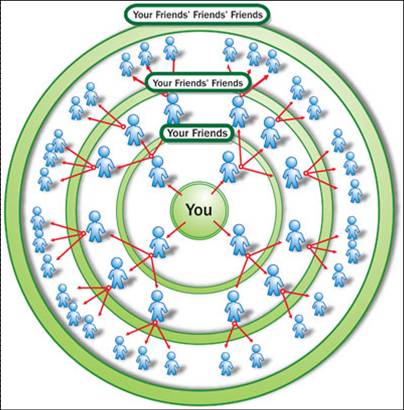
So using a person as a starting point, we want to go out two friends relationships away and return with those friends of friends.
January 4, 2012 10:53 AM
Getting started with Ruby and Neo4j is very easy.
Follow these steps and you’ll be up and running in no time.
First we install the neography gem:
Using Bundler:
echo "source 'http://rubygems.org'
gem 'neography' " > Gemfile
bundle install
Without Bundler:
gem install neography
Then we’ll add our tasks to a Rakefile, download Neo4j and start it:
echo "require 'neography/tasks'" > Rakefile
rake neo4j:install
rake neo4j:start
What can you do with a graph database?
How about recommend friends on a Social Network?
require 'rubygems'
require 'neography'

@neo = Neography::Rest.new

def create_person(name)
  @neo.create_node("name" => name)
end

def make_mutual_friends(node1, node2)
  @neo.create_relationship("friends", node1, node2)
  @neo.create_relationship("friends", node2, node1)
end

def suggestions_for(node)
  @neo.traverse(node,
                "nodes",
                {"order" => "breadth first",
                 "uniqueness" => "node global",
                 "relationships" => {"type"=> "friends",
                                     "direction" => "in"},
                 "return filter" => {"language" => "javascript",
                                     "body" => "position.length() == 2;"},
                 "depth" => 2}).map{|n| n["data"]["name"]}.join(', ')
end

johnathan = create_person('Johnathan')
mark      = create_person('Mark')
phil      = create_person('Phil')
mary      = create_person('Mary')
luke      = create_person('Luke')

make_mutual_friends(johnathan, mark)
make_mutual_friends(mark, mary)
make_mutual_friends(mark, phil)
make_mutual_friends(phil, mary)
make_mutual_friends(phil, luke)

puts "Johnathan should become friends with #{suggestions_for(johnathan)}"

# RESULT
# Johnathan should become friends with Mary, Phil
Let’s go through each step:
We require our gems and get an instance of Neography connecting to the Neo4j server:
require 'rubygems'
require 'neography'

@neo = Neography::Rest.new
We write a function to make it easy for us to create nodes that have a name property:
def create_person(name)
  @neo.create_node("name" => name)
end
Then we create another function to relate two nodes together.
In Neo4j all relationships have a direction, so if want two people to be mutual friends we create two relationships one incoming and one outgoing.
def make_mutual_friends(node1, node2)
  @neo.create_relationship("friends", node1, node2)
  @neo.create_relationship("friends", node2, node1)
end
Now comes the fun part. We want to suggest that you become friends with the friends of your friends.
So using a person as a starting point, we want to go out two friends relationships away and return with those friends of friends.
def suggestions_for(node)
  @neo.traverse(node,
                "nodes",
                {"order" => "breadth first",
                 "uniqueness" => "node global",
                 "relationships" => {"type"=> "friends",
                                     "direction" => "in"},
                 "return filter" => {"language" => "javascript",
                                     "body" => "position.length() == 2;"},
                 "depth" => 2}).map{|n| n["data"]["name"]}.join(', ')
end
Let’s test this out by creating a small set of friends and link them together:
johnathan = create_person('Johnathan')
mark      = create_person('Mark')
phil      = create_person('Phil')
mary      = create_person('Mary')
luke      = create_person('Luke')

make_mutual_friends(johnathan, mark)
make_mutual_friends(mark, mary)
make_mutual_friends(mark, phil)
make_mutual_friends(phil, mary)
make_mutual_friends(phil, luke)

puts "Johnathan should become friends with #{suggestions_for(johnathan)}"

# RESULT
# Johnathan should become friends with Mary, Phil
There you have it. Pretty simple right?
No? If it looks like a bit much, can we make it easier?
Absolutely. Neography lets you work at the Neo4j REST API level, but also provides an additional layer sprinkled with ruby syntactic sugar.
require 'rubygems'
require 'neography'

def create_person(name)
  Neography::Node.create("name" => name)
end

johnathan = create_person('Johnathan')
mark      = create_person('Mark')
phil      = create_person('Phil')
mary      = create_person('Mary')
luke      = create_person('Luke')

johnathan.both(:friends) << mark
mark.both(:friends) << mary
mark.both(:friends) << phil
phil.both(:friends) << mary
phil.both(:friends) << luke

def suggestions_for(node)
  node.incoming(:friends).
       order("breadth first").
       uniqueness("node global").
       filter("position.length() == 2;").
       depth(2).
       map{|n| n.name }.join(', ')
end
puts "Johnathan should become friends with #{suggestions_for(johnathan)}"

# RESULT
# Johnathan should become friends with Mary, Phil
Take a look at the Neography Documentation for more.
In this post we saw how to traverse the graph using the Traversal Framework directly.
In upcoming posts, I’ll show you two more ways to traverse the graph via Gremlin and Cypher as well as many more things you can do with Neo4j.
Find me and many other graph aficionados at the Neo4j Google Group.
Posted by maxdemarzi
Categories: Neography
Tags: graph database, neo4j, ruby
Mobile Site | Full Site
Get a free blog at WordPress.com Theme: WordPress Mobile Edition by Alex King.
[…] I showed you how to get Neo4j up and running with Ruby and how to find recommended friends on a social network. What about finding out how you are connected to someone outside of your […]
By How you’re connected to Kevin Bacon « Max De Marzi on January 5, 2012 at 9:21 AM
[…] Getting started with Ruby and Neo4j […]
By Getting started with Ruby and Neo4j « Another Word For It on January 5, 2012 at 3:11 PM
[…] can speak the gremlin language, and as promised I’ll show you how you can use it to implement friend recommendations as well as degrees of […]
By Gremlin with Neography « Max De Marzi on January 6, 2012 at 1:13 AM
[…] far we’ve learned how to get Neo4j up and running with Neography, how to find friends of friends and degrees of separation with the Neo4j REST API […]
By Graph Visualization and Neo4j « Max De Marzi on January 11, 2012 at 8:05 AM
[…] is the query language of Neo4j, and as promised I’ll show you how you can use it to implement friend recommendations as well as degrees of […]
By Using Cypher with Neography « Another Word For It on February 12, 2012 at 4:16 PM
I had to download the rubyzip and httparty gems and require zip/zip and httparty in the Rakefile to get this working.
By rubberbaronChris on February 18, 2012 at 5:42 PM
Make sure you are using version 22, it has dependencies for rake and rubyzip
By maxdemarzi on February 18, 2012 at 6:36 PM
Good article. Thanks for the writeup maxdemarzi
By indykish on June 28, 2012 at 5:52 AM
thanks…
By ankit on January 2, 2013 at 5:24 AM
I thought I should let you know that, after installing the neography gem [in Windows, for Ruby 1.9.3], the installation of Neo4j using Rake failed with the following message:
“rake aborted!
“Don’t know how to build task ‘neo4j:install’ ”
I will go ahead and manually install Neo4j, but I wonder what has broken here . . .
Thx
Roger
By Roger SPerberg on March 14, 2013 at 10:50 AM
You need to:
echo “require ‘neography/tasks'” > Rakefile
rake neo4j:install
rake neo4j:start
See the gem readme or https://maxdemarzi.com/2012/01/04/getting-started-with-ruby-and-neo4j/
By maxdemarzi on March 15, 2013 at 8:20 AM
I discovered that, at least on my Win7 machine, the echo command was inserting quotes around the words “require ‘neography/tasks'” in the Rakefile. That was preventing the next line, rake neo4j:install, from working.
I also discovered that copying the text from your message was problematic because it uses ` instead of ‘ for the left single-quote (eg, back-tick instead of ').
The installation still doesn’t work. Here are the error messages:
C:\neo4j>rake neo4j:install –trace
** Invoke neo4j:install (first_time)
** Execute neo4j:install
Installing Neo4j-community-1.8.2
rake aborted!
uninitialized constant Zip
C:/Ruby193/lib/ruby/1.9.1/rake/ext/module.rb:36:in `const_missing’
C:/Ruby193/lib/ruby/gems/1.9.1/gems/neography-1.0.7/lib/neography/tasks.rb:23:in
`block (2 levels) in ‘
C:/Ruby193/lib/ruby/1.9.1/rake/task.rb:205:in `call’
C:/Ruby193/lib/ruby/1.9.1/rake/task.rb:205:in `block in execute’
C:/Ruby193/lib/ruby/1.9.1/rake/task.rb:200:in `each’
C:/Ruby193/lib/ruby/1.9.1/rake/task.rb:200:in `execute’
C:/Ruby193/lib/ruby/1.9.1/rake/task.rb:158:in `block in invoke_with_call_chain’
C:/Ruby193/lib/ruby/1.9.1/monitor.rb:211:in `mon_synchronize’
C:/Ruby193/lib/ruby/1.9.1/rake/task.rb:151:in `invoke_with_call_chain’
C:/Ruby193/lib/ruby/1.9.1/rake/task.rb:144:in `invoke’
C:/Ruby193/lib/ruby/1.9.1/rake/application.rb:116:in `invoke_task’
C:/Ruby193/lib/ruby/1.9.1/rake/application.rb:94:in `block (2 levels) in top_lev
el’
C:/Ruby193/lib/ruby/1.9.1/rake/application.rb:94:in `each’
C:/Ruby193/lib/ruby/1.9.1/rake/application.rb:94:in `block in top_level’
C:/Ruby193/lib/ruby/1.9.1/rake/application.rb:133:in `standard_exception_handlin
g’
C:/Ruby193/lib/ruby/1.9.1/rake/application.rb:88:in `top_level’
C:/Ruby193/lib/ruby/1.9.1/rake/application.rb:66:in `block in run’
C:/Ruby193/lib/ruby/1.9.1/rake/application.rb:133:in `standard_exception_handlin
g’
C:/Ruby193/lib/ruby/1.9.1/rake/application.rb:63:in `run’
C:/Ruby193/bin/rake:32:in `’
Tasks: TOP => neo4j:install
C:\neo4j>
I note that each of the referenced lines has the same back-tick (`) instead of apos (‘). I wonder if that’s the problem and why?
Thanks,
Roger
By Roger on March 15, 2013 at 9:37 AM
Whoops! Zip was not required in the task file.
Grab neography 1.0.8 (just released 2 minutes ago) and it should have this fix in place.
By maxdemarzi on March 15, 2013 at 9:50 AM
Wow, thanks! Your whole website is filled with things that interest me; I don’t have to use ruby to explore Neo4j, but it’s my first choice.
So I uninstalled neography 1.0.7 and installed 1.0.8. Unfortunately, I then got these error messages:
C:\neo4j>rake neo4j:install –trace
** Invoke neo4j:install (first_time)
** Execute neo4j:install
Installing Neo4j-community-1.8.2
rake aborted!
Zip end of central directory signature not found
C:/Ruby193/lib/ruby/gems/1.9.1/gems/rubyzip-0.9.9/lib/zip/zip_central_directory.
rb:97:in `get_e_o_c_d’
C:/Ruby193/lib/ruby/gems/1.9.1/gems/rubyzip-0.9.9/lib/zip/zip_central_directory.
rb:55:in `read_e_o_c_d’
C:/Ruby193/lib/ruby/gems/1.9.1/gems/rubyzip-0.9.9/lib/zip/zip_central_directory.
rb:85:in `read_from_stream’
C:/Ruby193/lib/ruby/gems/1.9.1/gems/rubyzip-0.9.9/lib/zip/zip_file.rb:67:in `blo
ck in initialize’
C:/Ruby193/lib/ruby/gems/1.9.1/gems/rubyzip-0.9.9/lib/zip/zip_file.rb:66:in `open’
C:/Ruby193/lib/ruby/gems/1.9.1/gems/rubyzip-0.9.9/lib/zip/zip_file.rb:66:in `initialize’
C:/Ruby193/lib/ruby/gems/1.9.1/gems/rubyzip-0.9.9/lib/zip/zip_file.rb:87:in `new’
C:/Ruby193/lib/ruby/gems/1.9.1/gems/rubyzip-0.9.9/lib/zip/zip_file.rb:87:in `open’
C:/Ruby193/lib/ruby/gems/1.9.1/gems/neography-1.0.8/lib/neography/tasks.rb:25:in
`block (2 levels) in ‘
C:/Ruby193/lib/ruby/1.9.1/rake/task.rb:205:in `call’
C:/Ruby193/lib/ruby/1.9.1/rake/task.rb:205:in `block in execute’
C:/Ruby193/lib/ruby/1.9.1/rake/task.rb:200:in `each’
C:/Ruby193/lib/ruby/1.9.1/rake/task.rb:200:in `execute’
C:/Ruby193/lib/ruby/1.9.1/rake/task.rb:158:in `block in invoke_with_call_chain’
C:/Ruby193/lib/ruby/1.9.1/monitor.rb:211:in `mon_synchronize’
C:/Ruby193/lib/ruby/1.9.1/rake/task.rb:151:in `invoke_with_call_chain’
C:/Ruby193/lib/ruby/1.9.1/rake/task.rb:144:in `invoke’
C:/Ruby193/lib/ruby/1.9.1/rake/application.rb:116:in `invoke_task’
C:/Ruby193/lib/ruby/1.9.1/rake/application.rb:94:in `block (2 levels) in top_level’
C:/Ruby193/lib/ruby/1.9.1/rake/application.rb:94:in `each’
C:/Ruby193/lib/ruby/1.9.1/rake/application.rb:94:in `block in top_level’
C:/Ruby193/lib/ruby/1.9.1/rake/application.rb:133:in `standard_exception_handling’
C:/Ruby193/lib/ruby/1.9.1/rake/application.rb:88:in `top_level’
C:/Ruby193/lib/ruby/1.9.1/rake/application.rb:66:in `block in run’
C:/Ruby193/lib/ruby/1.9.1/rake/application.rb:133:in `standard_exception_handling’
C:/Ruby193/lib/ruby/1.9.1/rake/application.rb:63:in `run’
C:/Ruby193/bin/rake:32:in `’
Tasks: TOP => neo4j:install
Roger
By Roger on March 15, 2013 at 10:44 AM
Make sure you delete any stray neo4j.zip files lying around first.
By maxdemarzi on March 15, 2013 at 11:13 AM
That was the problem exactly. Installation occurred flawlessly after removing the neo4j.zip file in the same directory.
Thanks!
Roger
By Roger on March 15, 2013 at 1:02 PM
Hey roger,
How did you got rid of this problem. I am facing the same problem.
rake neo4j:install command creating a neo4j.zip file every time I run it and even deleting it not helping.
Any help will be appreciated.
By Nitesh on April 15, 2013 at 10:23 AM
fairly easy install here.
some notes
this is more a rails neo4j tutorial. trying to do this in irb is a bit trickey
{btw i did this all on ruby2 rails 4 no issues}
on debian/ubuntu this may be of use. there was no mention that one needed a jdk runtime
i need to do this. rake neo4j:start silently fails otherwise
sudo apt-get install openjdk-6-jre-headless
other than that the examples worked fine!
now, for me, its onto looking over the three.js article and transposing to x3dom :D
By drfrog666 on April 6, 2013 at 9:24 PM
I have downloaded neography from http://www.neo4j.org/develop/ruby and I have changed the folder name to Neo4j and putted it in rails application main folder. When I am running ‘rake neo4j:install’ command I am getting following error :
C:\Sites\blog\Neo4j>rake neo4j:install -trace
rake aborted!
Unrecognized –trace option ‘race’
C:/RailsInstaller/Ruby1.9.3/lib/ruby/gems/1.9.1/gems/rake-10.0.4/lib/rake/applic
ation.rb:514:in `select_trace_output’
C:/RailsInstaller/Ruby1.9.3/lib/ruby/gems/1.9.1/gems/rake-10.0.4/lib/rake/applic
ation.rb:472:in `block in standard_rake_options’
C:/RailsInstaller/Ruby1.9.3/lib/ruby/1.9.1/optparse.rb:1391:in `call’
C:/RailsInstaller/Ruby1.9.3/lib/ruby/1.9.1/optparse.rb:1391:in `block in parse_i
n_order’
C:/RailsInstaller/Ruby1.9.3/lib/ruby/1.9.1/optparse.rb:1347:in `catch’
C:/RailsInstaller/Ruby1.9.3/lib/ruby/1.9.1/optparse.rb:1347:in `parse_in_order’
C:/RailsInstaller/Ruby1.9.3/lib/ruby/1.9.1/optparse.rb:1341:in `order!’
C:/RailsInstaller/Ruby1.9.3/lib/ruby/1.9.1/optparse.rb:1432:in `permute!’
C:/RailsInstaller/Ruby1.9.3/lib/ruby/1.9.1/optparse.rb:1453:in `parse!’
C:/RailsInstaller/Ruby1.9.3/lib/ruby/gems/1.9.1/gems/rake-10.0.4/lib/rake/applic
ation.rb:524:in `handle_options’
C:/RailsInstaller/Ruby1.9.3/lib/ruby/gems/1.9.1/gems/rake-10.0.4/lib/rake/applic
ation.rb:81:in `block in init’
C:/RailsInstaller/Ruby1.9.3/lib/ruby/gems/1.9.1/gems/rake-10.0.4/lib/rake/applic
ation.rb:160:in `standard_exception_handling’
C:/RailsInstaller/Ruby1.9.3/lib/ruby/gems/1.9.1/gems/rake-10.0.4/lib/rake/applic
ation.rb:79:in `init’
C:/RailsInstaller/Ruby1.9.3/lib/ruby/gems/1.9.1/gems/rake-10.0.4/lib/rake/applic
ation.rb:71:in `block in run’
C:/RailsInstaller/Ruby1.9.3/lib/ruby/gems/1.9.1/gems/rake-10.0.4/lib/rake/applic
ation.rb:160:in `standard_exception_handling’
C:/RailsInstaller/Ruby1.9.3/lib/ruby/gems/1.9.1/gems/rake-10.0.4/lib/rake/applic
ation.rb:70:in `run’
C:/RailsInstaller/Ruby1.9.3/lib/ruby/gems/1.9.1/gems/rake-10.0.4/bin/rake:33:in
`’
C:/RailsInstaller/Ruby1.9.3/bin/rake:23:in `load’
C:/RailsInstaller/Ruby1.9.3/bin/rake:23:in `’
When Ever I run this rake neo4j:install command it creates a neo4j.zip file automatically in the folder. I have tried deleting this as well but it gets created every time I run this rake command.
Any help will be appreciated.
By Nitesh on April 14, 2013 at 2:51 PM
Unrecognized –trace option ‘race’
run it without trace.
All it does is download Neo4j and save it to a “neo4j” directory.
By maxdemarzi on April 14, 2013 at 5:00 PM
running without trace gives this. It creates a neo4j.zip file in neo4j directory. I have tried after deleting that as well but it doesn’t work.
C:\Sites\blog\neo4j>rake neo4j:install
Installing Neo4j-community-1.8.2
rake aborted!
Zip end of central directory signature not found
Tasks: TOP => neo4j:install
(See full trace by running task with –trace)
By Nitesh on April 14, 2013 at 11:55 PM
how to use the above mention code in ROR app please guide.
By Shamshul Azam on May 8, 2013 at 3:04 AM
Hi, I’ve built a gem based on this tutorial .. you can find it here:
https://rubygems.org/gems/neo4j-friendships
By Tarek N. Samniek on November 19, 2013 at 4:36 AM
Thanks for your reply
By Shamshul on November 22, 2013 at 12:50 PM
Hi, I’ve built a gem based on this tutorial .. you can find it here:
https://rubygems.org/gems/neo4j-friendships
By Tarek N. Samni on September 30, 2013 at 5:16 AM
Is it possible to add a Property as well in graph traversal. I mean restrict traversal to the nodes and relationships where Property p’s value is TRUE?
By Nitesh on October 29, 2013 at 8:33 AM
During the neo4j:install I was getting many errors, turns out I had to add the full path of the tasks file to the Rakefile and also install the curl package on my system, which my distro had not.
Perhaps it would be best to check if it exists before trying to use it, and if not, warn the user about it, otherwise it might take a while till one can find out about it.
Anyways, looking forward to trying your API, thanks.
By Osmar on December 6, 2013 at 7:21 AM
I have installed neo4j successfully. I am using Rubymine as the editor. Please can someone tell me how to run the code. I am getting this error :
/Users/yahya/.rvm/gems/ruby-1.9.3-p194@global/gems/bundler-1.2.0/lib/bundler/spec_set.rb:90:in `block in materialize’: Could not find rake-10.1.0 in any of the sources (Bundler::GemNotFound)
from /Users/yahya/.rvm/gems/ruby-1.9.3-p194@global/gems/bundler-1.2.0/lib/bundler/spec_set.rb:83:in `map!’
from /Users/yahya/.rvm/gems/ruby-1.9.3-p194@global/gems/bundler-1.2.0/lib/bundler/spec_set.rb:83:in `materialize’
from /Users/yahya/.rvm/gems/ruby-1.9.3-p194@global/gems/bundler-1.2.0/lib/bundler/definition.rb:113:in `specs’
from /Users/yahya/.rvm/gems/ruby-1.9.3-p194@global/gems/bundler-1.2.0/lib/bundler/definition.rb:162:in `specs_for’
from /Users/yahya/.rvm/gems/ruby-1.9.3-p194@global/gems/bundler-1.2.0/lib/bundler/definition.rb:151:in `requested_specs’
from /Users/yahya/.rvm/gems/ruby-1.9.3-p194@global/gems/bundler-1.2.0/lib/bundler/environment.rb:23:in `requested_specs’
from /Users/yahya/.rvm/gems/ruby-1.9.3-p194@global/gems/bundler-1.2.0/lib/bundler/runtime.rb:11:in `setup’
from /Users/yahya/.rvm/gems/ruby-1.9.3-p194@global/gems/bundler-1.2.0/lib/bundler.rb:116:in `setup’
from /Users/yahya/.rvm/gems/ruby-1.9.3-p194@global/gems/bundler-1.2.0/lib/bundler/setup.rb:17:in `’
from /Users/yahya/.rvm/rubies/ruby-1.9.3-p194/lib/ruby/site_ruby/1.9.1/rubygems/custom_require.rb:36:in `require’
from /Users/yahya/.rvm/rubies/ruby-1.9.3-p194/lib/ruby/site_ruby/1.9.1/rubygems/custom_require.rb:36:in `require’
By Yahya Poonawala on December 10, 2013 at 5:02 AM
Its very helpful
By Shamshul on June 24, 2014 at 8:24 PM
[…] Using Neo4j from Ruby. Getting started with Ruby and Neo4j. Getting started with Ruby and Neo4j is very […]
By Neo4j Visualization Tools | Pearltrees on December 14, 2014 at 7:46 PM